Design, deploy and load-test cloud infrastructure on your laptop.
Drag and connect resources from AWS, Azure, Google Cloud and OCI, or open your docker-compose and Kubernetes manifests; get clean code out of it, run it on your machine and see how it holds up under traffic. Nothing touches your real account — or your bill.
Deployed — your API is liveGEThttp://127.0.0.1:45123/…/itemsOpen EndpointsLoad test
How it works
From idea to tested infrastructure in four steps
Design it, run it locally, put it under load, then take the Terraform with you.
01DesignDrag resources, connect them, get the wiring right.drag · connect · ⌘K
02Run locallyDeploy into a private cloud sandbox on your machine.Floci · Docker
03TestCall every endpoint and load-test it with live charts.p95 12 ms · passed
04Ship TerraformExport formatted code and tfvars for each environment.main.tf · dev.tfvars
Features
Everything between the whiteboard and production
One app for the parts of cloud work that usually need a real account, a pile of config files and some courage.
Design by connecting
Drag, drop, connect. That's your architecture.
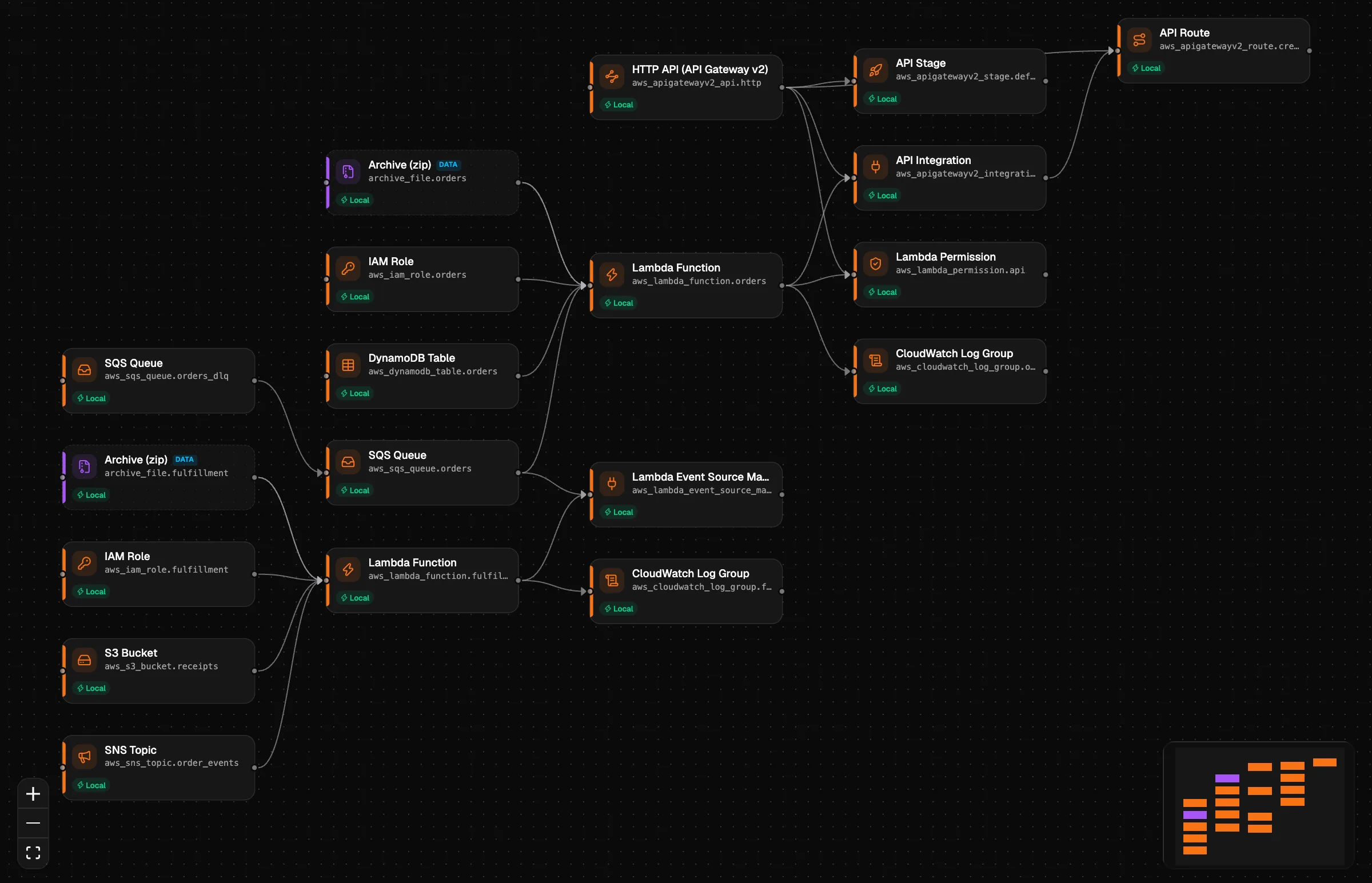
Every resource of the AWS, Azure, Google Cloud and OCI Terraform providers — about 5,200 types — is a node on a canvas. Connect two nodes and Nimbo wires them up for you.
Guided mode: required fields first, sensible defaults and one-click recipes like “SQS → Lambda trigger”
Pro mode: every attribute, raw HCL expressions, meta-arguments and a ⌘K command palette
Trigger the function from the queueRecommendedAdds an event source mapping and the IAM permissions
Let the function send messagesGrants sqs:SendMessage and passes the URL
Only reference the queue URLSets an environment variable
Recipe applied · 2 resources, 3 connections
Terraform both ways
Export clean Terraform. Or bring yours.
Export any workflow as idiomatic, terraform fmt–clean files with a .tfvars per environment. Already have Terraform? Import a whole folder — local modules included — and get the diagram back, with connections derived from references.
Plain HCL you own: no lock-in, no proprietary format
A .tfvars file per environment
Import a repo folder and finally see its architecture
Terraform · both ways
ImportExportImported 2 environments · 1 module
NetworkModulemodule.network
./modules/network
Thumbnailsaws_lambda_function.thumbs
Local
Uploadsaws_s3_bucket.uploads
Local
~/infra
envs/
dev/
terraform.tfvars
prod/
modules/
network/
main.tf
Reading HCL…
main.tfenvs/dev.tfvarsterraform fmt ✓
1module"network" {
2source = "./modules/network"
3}
4
5resource"aws_s3_bucket""uploads" {
6bucket = "${var.env}-uploads"
7}
8
9resource"aws_lambda_function""thumbs" {
10function_name = "${var.env}-thumbs"
11vpc_config {
12subnet_ids = module.network.subnets
13 }
14}
Architecture view
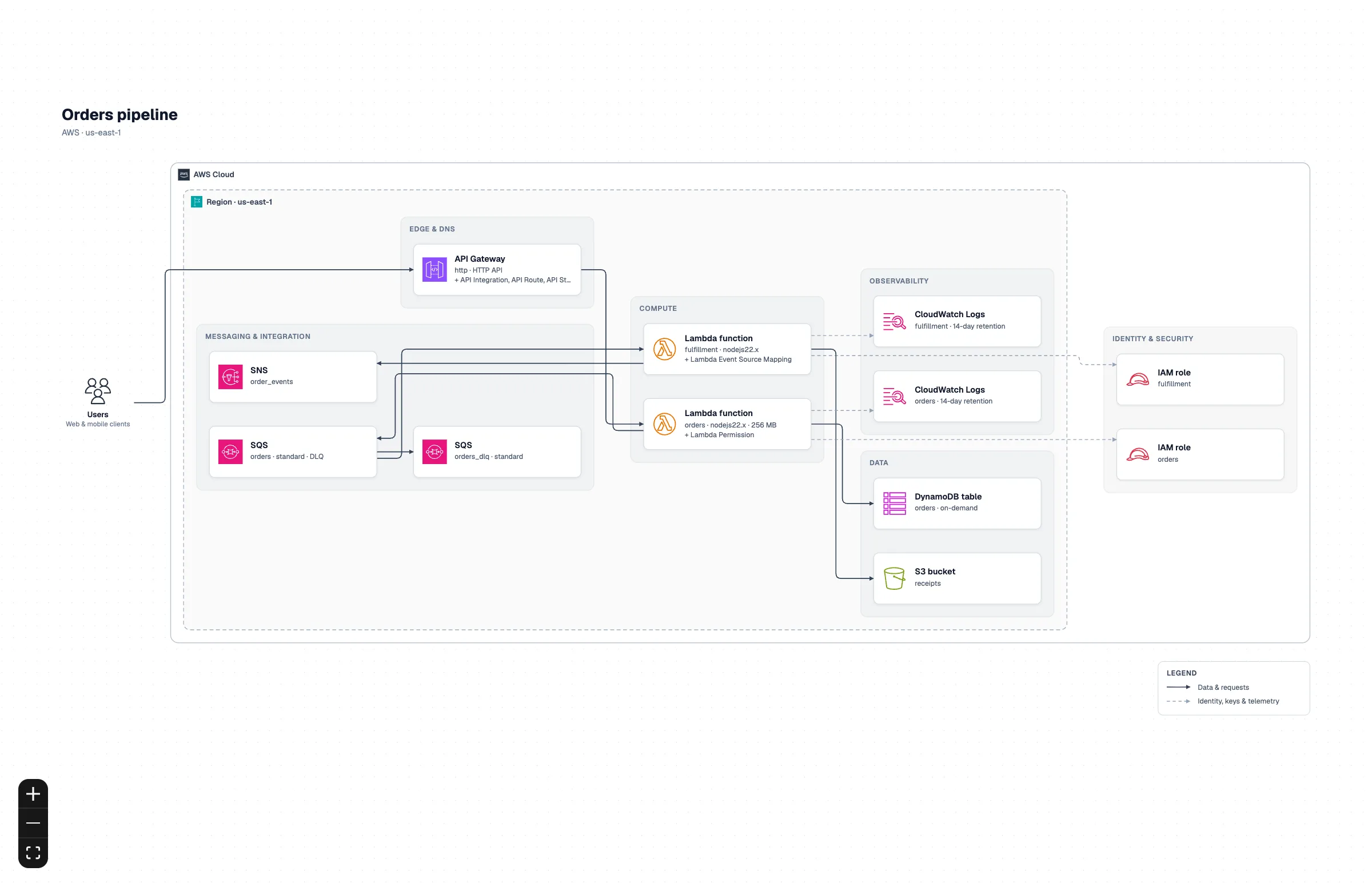
The same design, as an architecture diagram.
Switch from Build to Architecture and Nimbo draws your design as a reference architecture diagram: official icons, cloud → region → VPC → subnets nested, and arrows that follow the data. It comes from the same Terraform, so it never goes stale.
Official AWS, Azure, Google Cloud and Oracle Cloud icons
Security groups, route tables and gateways folded into the cards that use them
Modules expanded into their services, imported projects included
Export to PNG (up to 4×) or SVG for docs, reviews and slides
Orders pipelineBuildArchitecture
Docker workspaces
Your compose file, as a diagram that runs.
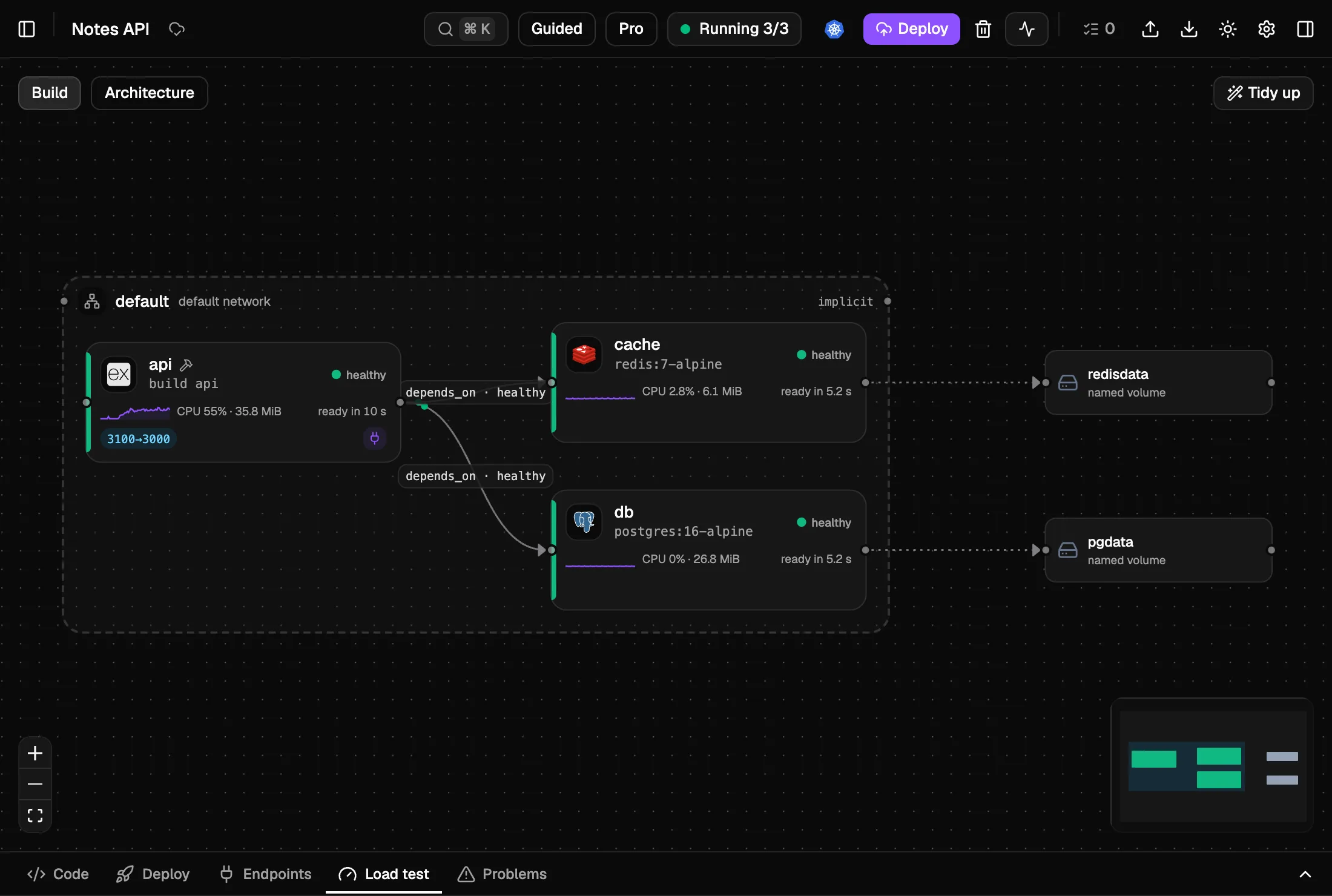
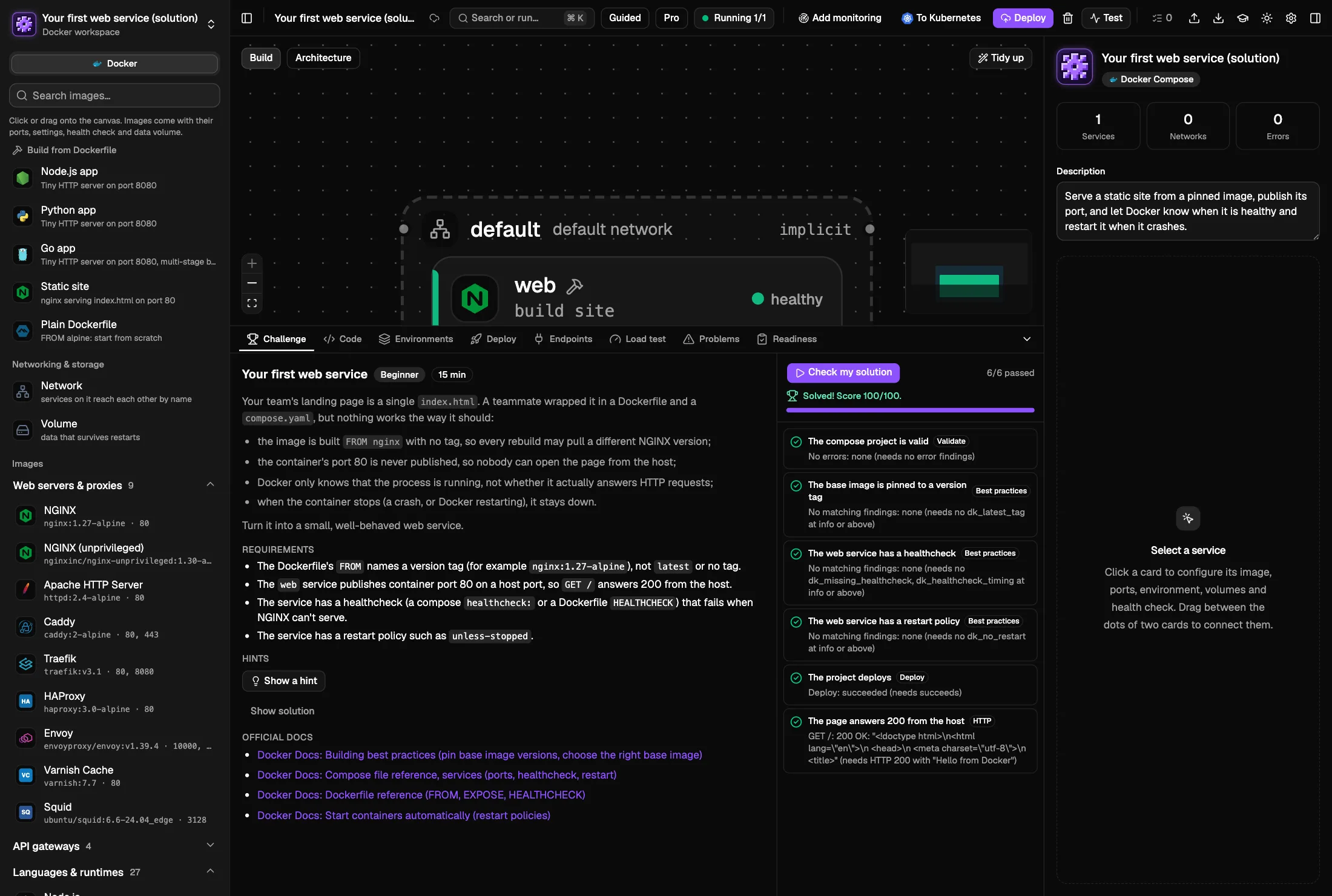
Open or create a docker-compose project: the compose files and Dockerfiles stay the source of truth. Services show up with their technology's icon, edits on the canvas go back into the YAML with your comments kept, and Deploy runs docker compose up with live state and logs.
168 images with pinned tags, health checks and connection settings
Best-practice checks with quick fixes: multi-stage builds, slim bases, non-root, health checks
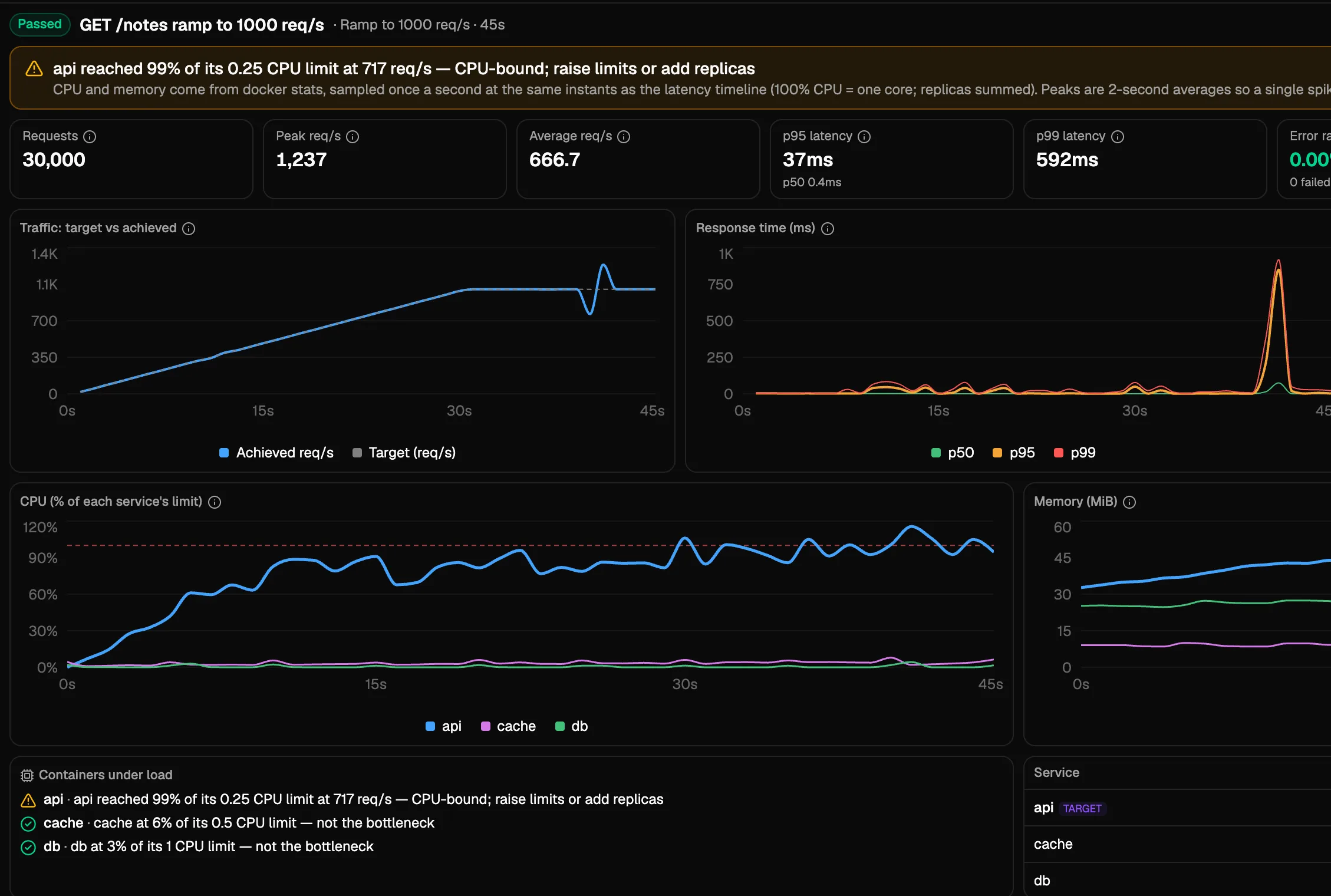
Load tests with live CPU and memory per container and a bottleneck verdict
Notes API · compose.yamlRunningLoad test
Kubernetes workspaces
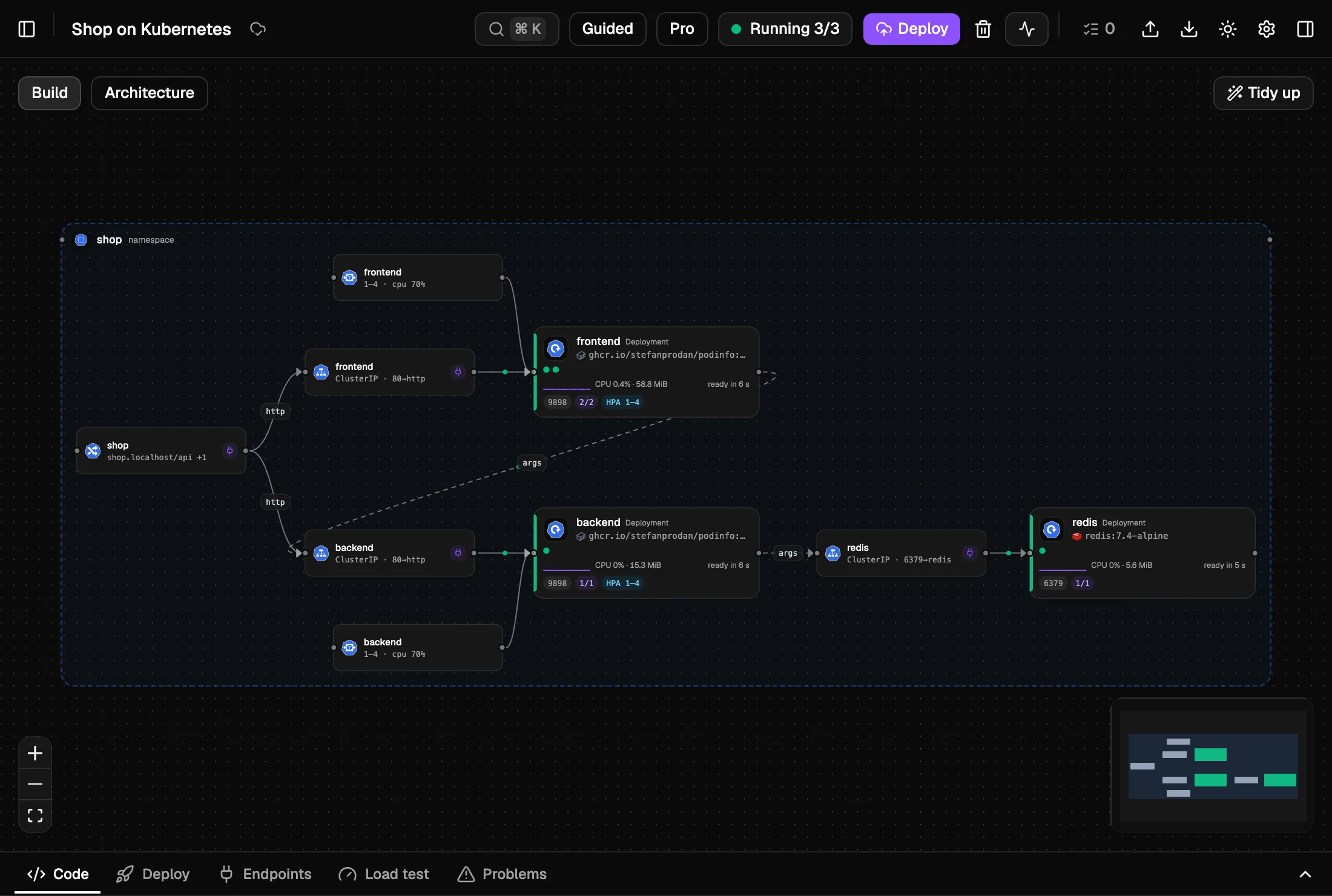
Manifests, Kustomize and Helm, on a cluster of its own.
Each workflow gets a local k3s cluster in a single Docker container — your ~/.kube/config is never touched. Nimbo builds your images, applies the manifests or installs the chart, and shows rollouts, pods, logs, port-forwards and Ingress URLs.
Overlays and values files become environments
Completion and checks from the Kubernetes schema, with quick fixes
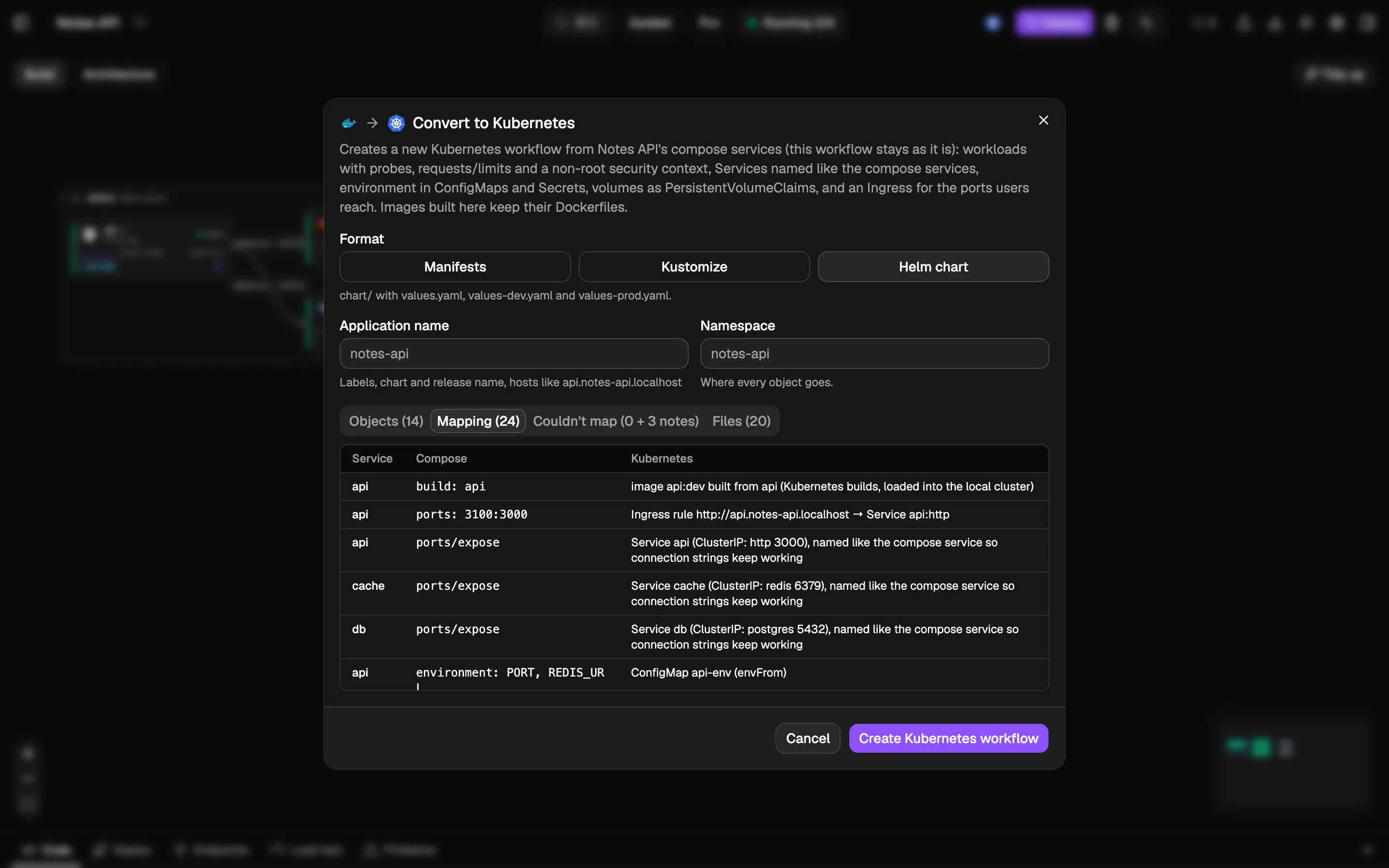
Convert to Kubernetes: a compose project becomes manifests, Kustomize or a Helm chart
Shop on KubernetesLocal clusterCompose → K8s
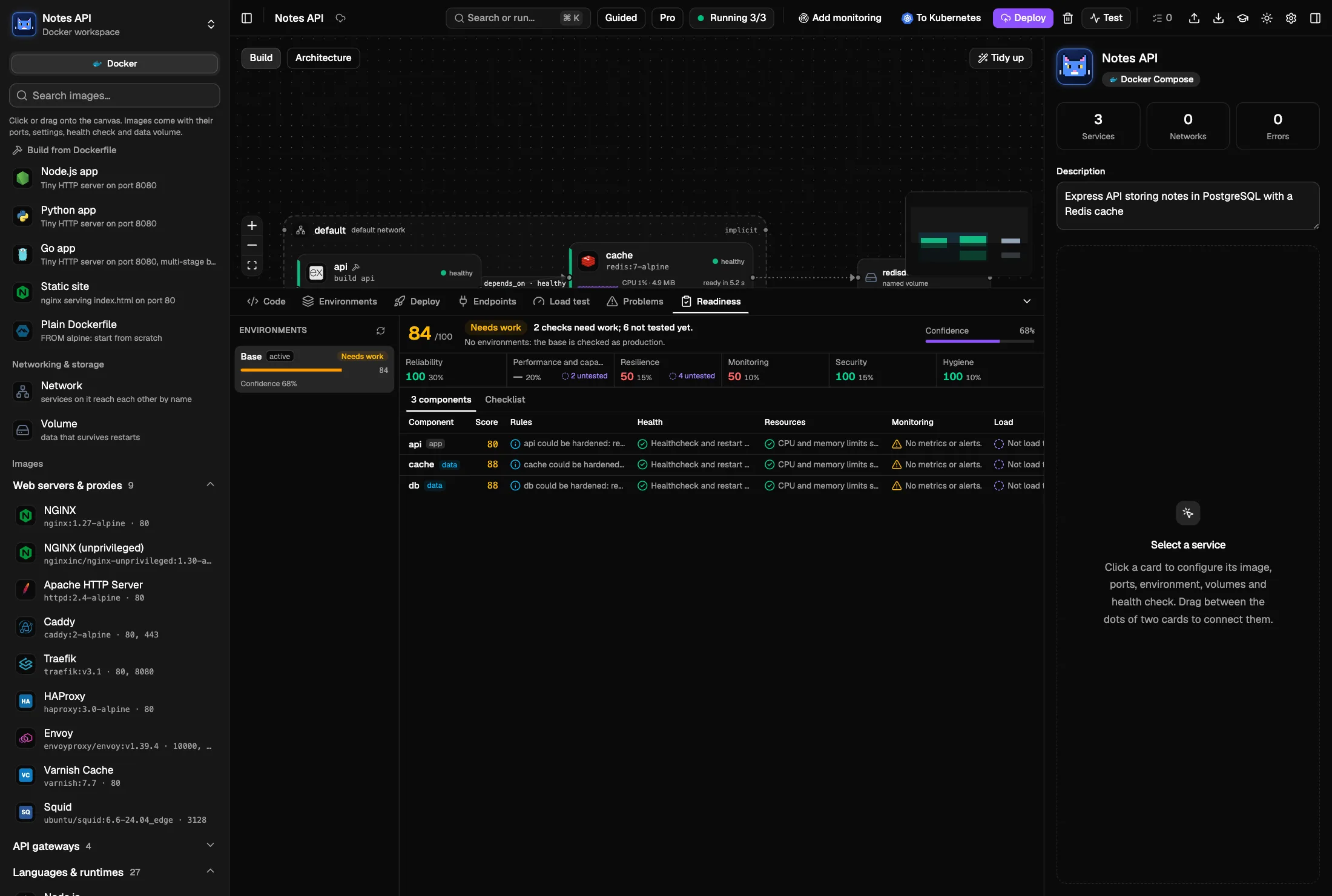
Production readiness
A readiness score backed by real tests.
Docker and Kubernetes workspaces get a Readiness score per environment, with a row per component. It combines the best-practice checks with evidence from your machine: load tests, incident scenarios, a capacity plan and monitoring. Every gap links to the check, test or fix that closes it.
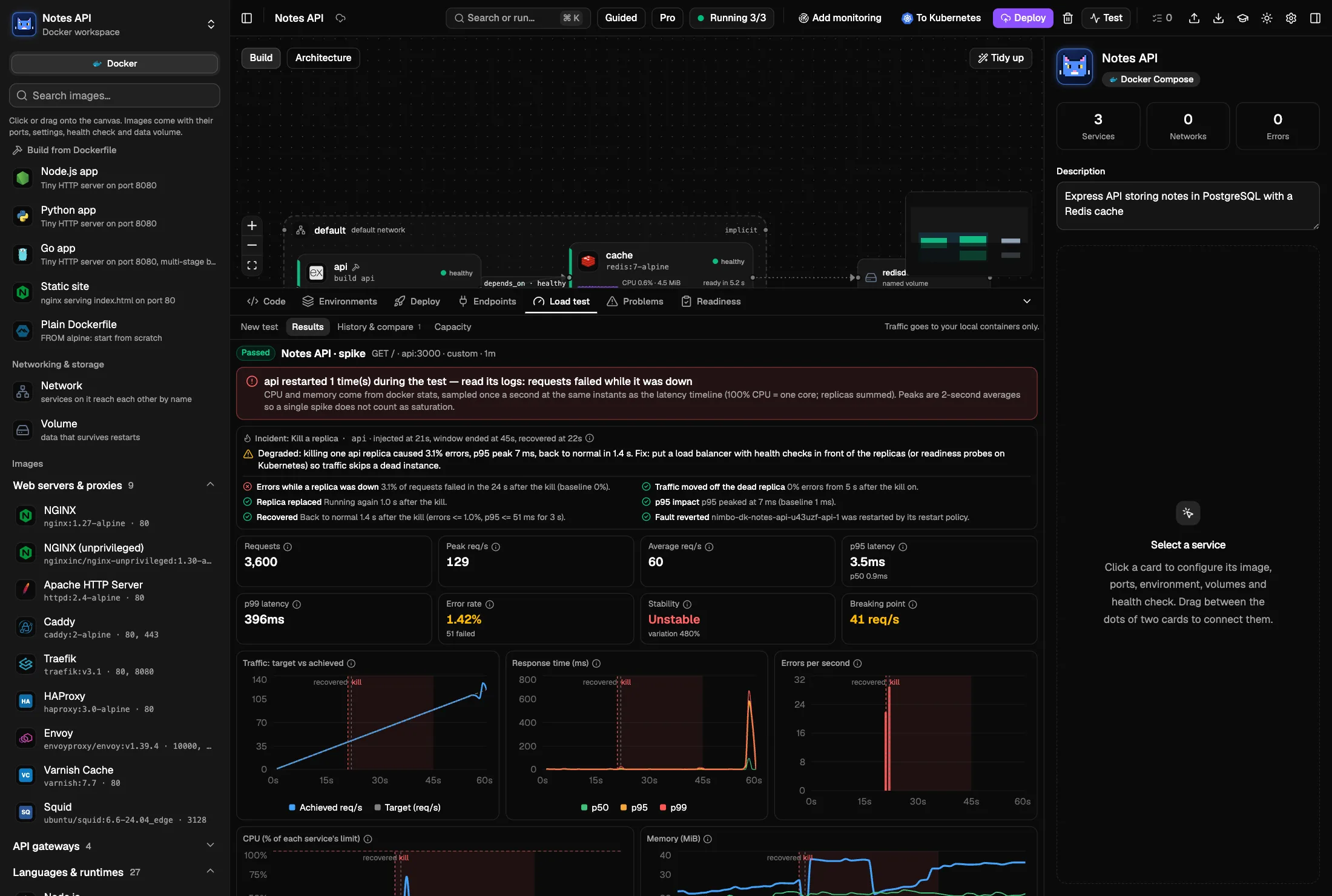
Incidents during a load test — kill a replica, take a dependency down or slow it, flush the cache, spike the traffic — with a survived, degraded or failed verdict
Capacity planner: replicas, nodes and monthly cost on AWS, Azure, Google Cloud and OCI from their list prices, applied to an environment in one click
Add monitoring in one click: Prometheus, Grafana and alerts, HTTP 5xx rate and p95 latency included
Environments from compose.<env>.yaml and .env.<env>, Kustomize overlays or Helm values, with compare and edit
Notes API · prodReadinessIncident
Learn
Roadmaps and challenges that Nimbo grades for real.
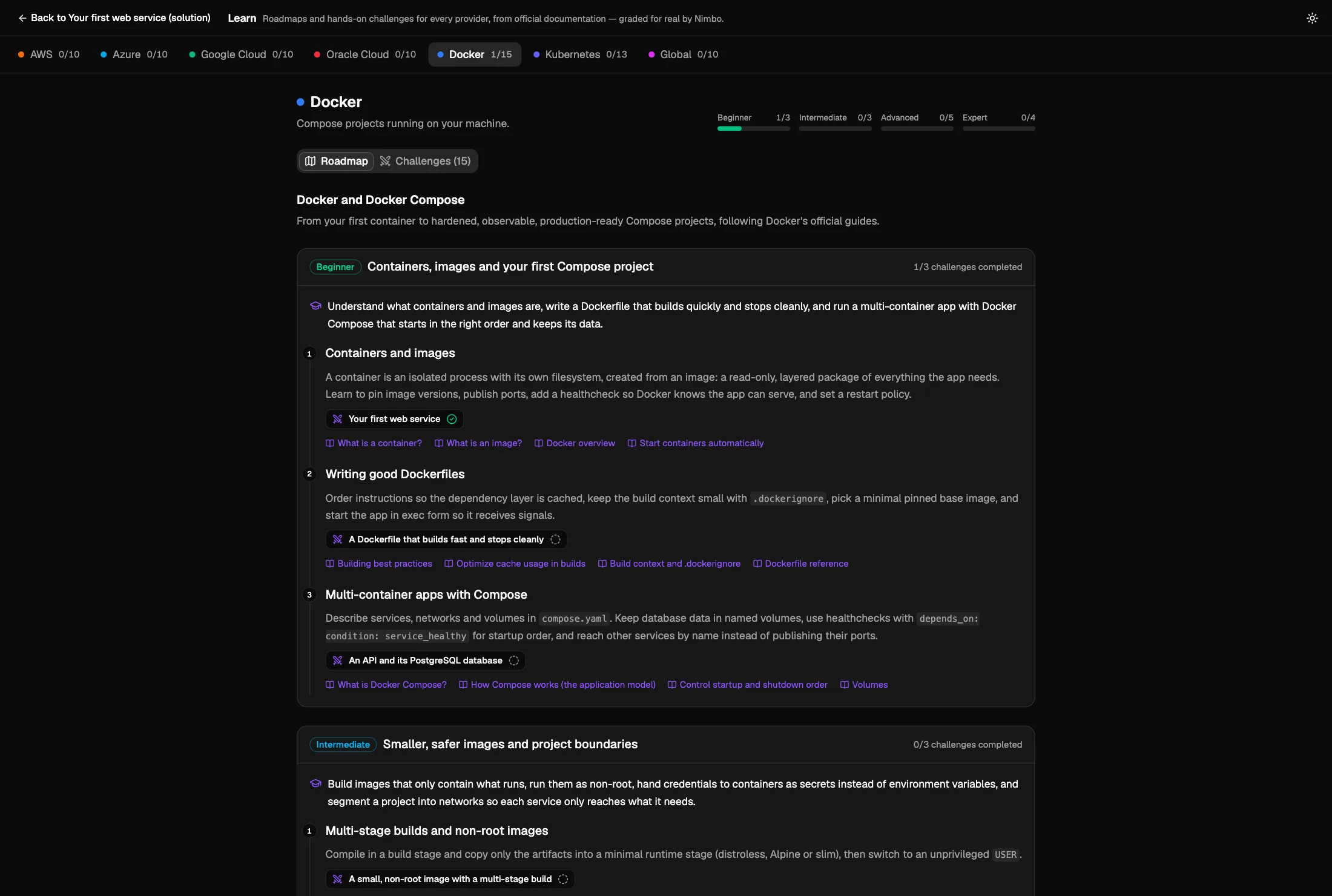
Roadmaps from beginner to expert and 78 hands-on challenges for AWS, Azure, Google Cloud, Oracle Cloud, Docker, Kubernetes and cross-cloud problems, based on the official docs and certification guides. Each one has a problem, requirements, hints and a solution. Press Check my solution and Nimbo grades your work.
Docker and Kubernetes challenges run on your machine: Nimbo deploys them and, depending on the goal, calls, load-tests or breaks them on purpose; most AWS ones run on the local emulator
Azure, Google Cloud and Oracle Cloud challenges are graded on the design: validation, best-practice rules and structure
Progress stays in a local database; new content arrives as community-contributed migrations
Learn · DockerRoadmapChallenge
Private local cloud
Deploy to a cloud that lives on your laptop.
Each workflow gets its own sandbox in Docker, running the Floci emulators it needs for AWS, Azure, Google Cloud and OCI. Terraform runs inside it, and the canvas shows what's deployed.
Nothing touches your real cloud account or your bill
One isolated sandbox per workflow
Local URLs and test credentials stay the same across restarts
Local sandbox · orders-api
Your machine
Docker
AWSfloci · :45123
Azurefloci-az · :45124
Google Cloudfloci-gcp · :45125
Oracle Cloudfloci-oci · :45126
$ terraform apply
Sandbox · 4 Floci emulators readyaws_sqs_queue.jobs: Creating...aws_sqs_queue.jobs: Creation complete after 1sazurerm_storage_account.files: Creation complete after 2sgoogle_pubsub_topic.events: Creation complete after 1soci_objectstorage_bucket.media: Creation complete after 1sApply complete! Resources: 4 added, 0 changed, 0 destroyed.
Know how it behaves under traffic — before production does.
Pick smoke, load, stress, spike or soak — or design your own stages. Watch latency percentiles, errors and a stability score live, find the breaking point and set pass/fail thresholds.
Live p50 / p95 / p99 latency, error rate and stability score
Nimbo ships a built-in MCP server. Your agent can create and extend workflows, deploy them to the sandbox, call what it deployed and load-test it — and you watch every change live on the canvas.
One-click install from Settings for
Claude Code
Claude Desktop
Cursor
Codex
VS Code
Windsurf
Gemini CLI
Try asking
›Create an HTTP API with a Lambda and a DynamoDB table and load-test it.
›Import the Terraform in ~/code/platform and tell me what's in it.
›Deploy this workflow and load-test the API: I need p95 under 200 ms at 50 rps.
AI agent · Nimbo MCP
Your AI agentnimbo MCP connected
Create an HTTP API with a Lambda and a DynamoDB table, deploy it and run a smoke test
nimbocreate_workfloworders-api
nimboadd_nodeaws_apigatewayv2_api
nimboadd_nodeaws_lambda_function
nimboadd_nodeaws_dynamodb_table
nimboconnectapi → fn → table
nimbodeploysandbox
nimborun_load_testsmoke
Done — the API is live in your sandbox and the smoke test passed.Passed · p95 12 ms
Nimbo · orders-api
API Gatewayaws_apigatewayv2_api.http
LocalDeployed
Lambdaaws_lambda_function.api
LocalDeployed
DynamoDBaws_dynamodb_table.items
LocalDeployed
Passed · p95 12 ms
Connections
Test the services you already have.
Save Connections to things that already run elsewhere — any HTTP API, PostgreSQL, MySQL, Redis, MongoDB, or a real AWS account through a profile — and load-test them from the home screen or from any workflow.
Header, bearer, basic and API-key auth
Secrets stay on your computer and are never shown again
Traffic that leaves the local sandbox always asks for confirmation
Connections
orders-dbPostgreSQL
db.internal:5432/orders
Test connectionTesting…PostgreSQL 16 · 4 ms
cacheRedis
cache.internal:6379
Test connectionTesting…Redis 7.4 · 1 ms
staging-apiHTTP APIReal
https://staging-api.example.com
Load testRunning smoke test…Smoke passed · p95 48 ms
aws-stagingAWSReal
profile staging · eu-west-1
Asks before every run
Send real traffic to staging-api.example.com?This load test hits a real service, not your sandbox. Only continue if you're allowed to test it.
Target
https://staging-api.example.com/health
Traffic
≈ 600 requests over 1 min
CancelSend traffic
Guided & Pro
Made for beginners and pros
Switch modes anytime. Same workflow, same Terraform — just a different amount of detail.
Guided
New to the cloud? Start here.
Only the fields you need, with curated defaults
One-click connection recipes
Plain-language explanations of what you deployed
A first-run guide that checks Docker for you
Pro
You know Terraform. Go fast.
Every attribute and raw HCL expressions
Meta-arguments and code editing
⌘K command palette
Import existing folders, export clean code
Inspector · aws_lambda_function.api
Lambdaaws_lambda_function.apiGuidedPro
Recommended connections are applied for you.
function_name"orders-api"
runtime"nodejs22.x"
handler"index.handler"
memory_size512
timeout10
roleaws_iam_role.api aws_iam_role.api.arn
Meta-argumentscountfor_eachdepends_on
HCL
resource"aws_lambda_function""api" {
function_name = "orders-api"
runtime = "nodejs22.x"
memory_size = 512
role = aws_iam_role.api.arn
}
Get started
Get started in one command
One script checks your computer, installs what's missing (asking first, from official sources) and builds the app.
macOS / Linux
$ git clone https://github.com/ismaelosuna7824/nimbo.git && cd nimbo && ./setup.sh
Docker isn't needed to build. On first launch, Nimbo checks Docker for your OS and the sandbox images, explains anything missing in plain language and fixes it with one click where it can. Setup guide →
Yes. Nimbo is free and runs on your own computer — no account, no sign-up, no subscription. The source code is on GitHub.
Does it touch my AWS account?
No. Deployments go to a private sandbox on your machine, powered by Floci emulators in Docker. A real account is only used if you explicitly save a Connection to it, and any traffic that leaves the local sandbox asks for your confirmation first.
Do I need Docker?
Yes, to run the local cloud: Docker Desktop, OrbStack, Colima, Rancher Desktop, Docker Engine on Linux, or Podman with the docker CLI all work. You don't need it to build the app — the first-run guide checks Docker for your OS and helps you fix what's missing. No host Terraform needed either.
Which clouds and services are supported?
For design and Terraform: every resource of the aws, azurerm, google and oci providers — about 5,200 types. For local deploys: what the Floci emulators support for AWS, Azure, Google Cloud and OCI. Nimbo tells you which resources can run locally.
Can I export my Terraform?
Yes. Every workflow exports as idiomatic, terraform fmt–clean files with a .tfvars per environment. It's plain Terraform you can commit and apply anywhere. You can also import an existing folder and get the diagram back.
How do AI agents connect?
Through Nimbo's built-in MCP server. Open Settings → AI agents and click Install for Claude Code, Claude Desktop, Cursor, Codex, VS Code, Windsurf or Gemini CLI — or register nimbo mcp manually. The agent's edits show up live in the app.
How are Learn challenges graded?
Every challenge lists its checks. Check my solution validates the workflow, runs the best-practice rules and inspects its structure. When a goal needs it, which happens in Docker, Kubernetes and most AWS challenges, Nimbo deploys locally and calls the endpoint, runs a load test or injects an incident. Azure, Google Cloud and Oracle Cloud challenges are graded on the design only: nothing is deployed for them.
Is my data sent anywhere?
The app is local-first: workflows, Connections and secrets stay on your computer (in ~/.nimbo). This website uses Google Analytics for Firebase only if you accept the cookie banner, and you can change your choice anytime from “Cookie settings” in the footer.
We'd like to use Google Analytics for Firebase to understand how this website is used. It only runs if you accept. The Nimbo app itself has no analytics.